Product analytics
Capture events via SDK or raw HTTP, resolve user identity, and explore a queryable event stream — with a tracking plan, session replay, and surveys.
AZ-Five ingests named events with JSON properties — signed_up, invoice_paid, page views — resolves who performed them, and stores them append-only in the same managed storage as every dataset. That last part matters: your events are not locked in an analytics silo. They are a dataset you can query with SQL, chart, and join against everything else.
Send your first event
Capture goes through an SDK or raw HTTP. There are two ingestion endpoints, and the distinction is deliberate:
POST /api/v1/events(and/api/v1/events/batch) authenticates with a secretazfive_…API key holding theevents:writescope. Server-side only — never ship this key to a browser.POST /api/v1/events/ingestauthenticates with a publicazfive_pub_…ingest token, validated server-side against the token’s allowed origins. Browser-safe and append-only. The token rides theAuthorizationheader, a?token=query parameter, or anapi_keyfield in the body — the last two exist sonavigator.sendBeaconworks.
# Server-side, secret key
curl -s https://app.az-five.com/api/v1/events \
  -H "Authorization: Bearer azfive_…" -H "Content-Type: application/json" \
  -d '{"events": [{"event": "signed_up", "distinct_id": "user-42",
       "properties": {"plan": "pro"}}]}'
# → {"accepted": 1, "rejected": 0}

# Browser, public token (this is what the SDKs call)
curl -s https://app.az-five.com/api/v1/events/ingest \
  -H "Authorization: Bearer azfive_pub_…" -H "Content-Type: application/json" \
  -d '{"events": [{"event": "az.page_view", "distinct_id": "anon_42",
       "properties": {"$url": "https://example.com/pricing"}}]}'
The body can be a single event, a bare array, or {"events": [...]}, with an optional project (default "default"). Content-Encoding: gzip is supported, and a per-event uuid gives you idempotency — client retries don’t duplicate.
The response is 200 with {accepted, rejected} counts — a bad event never turns the batch into a 4xx. An event is rejected when it is missing event or distinct_id, its serialized properties exceed 64 KiB, its name exceeds 200 characters, or it uses an undeclared az.* name. A missing timestamp defaults to now; supplied timestamps are clamped to [2000-01-01, now + 1 day] to keep clock-skew garbage out of your charts. A 429 means backpressure — ingest buffers full or the org over quota — and is retriable; the SDKs requeue and retry automatically.
System events live in the reserved az.* namespace: az.page_view, az.page_leave, az.interaction, az.screen_view, az.identify, az.alias, az.set, az.set_once, az.flag_called, az.survey_shown, az.survey_dismissed, az.survey_sent. Anything else in that namespace is rejected, so a user event can never impersonate a system one. Legacy PostHog-style $ names ($pageview, $identify, …) are accepted forever and canonicalized to the az.* names at ingest — old SDK builds keep working.
Identify users
Every distinct_id gets an anonymous person automatically. When the visitor logs in, send az.identify with the anonymous id to merge the two:
curl -s https://app.az-five.com/api/v1/events \
  -H "Authorization: Bearer azfive_…" -H "Content-Type: application/json" \
  -d '{"events": [{
    "event": "az.identify",
    "distinct_id": "ava@example.com",
    "properties": {"$anonymous_id": "anon_42"},
    "$set": {"plan": "pro", "name": "Ava"},
    "$set_once": {"signup_source": "pricing"}
  }]}'
$set overwrites person properties, $set_once fills them only the first time, and az.alias links two ids. The merge is applied asynchronously — person identity in analytics is eventually consistent and settles on the next compaction cycle (minutes). The raw distinct_id on each event is always correct immediately; once the merge lands, historical anonymous events count toward the identified person with no event rewrites.
Explore events
The Events explorer is where the stream becomes legible: full-text search with event, property, and person-property filters, a volume histogram, top-values breakdowns, user paths, and person drill-down (one person, all their distinct_ids and events). Property filters are fed by a harvested catalog — every observed key with its inferred type and usage count.
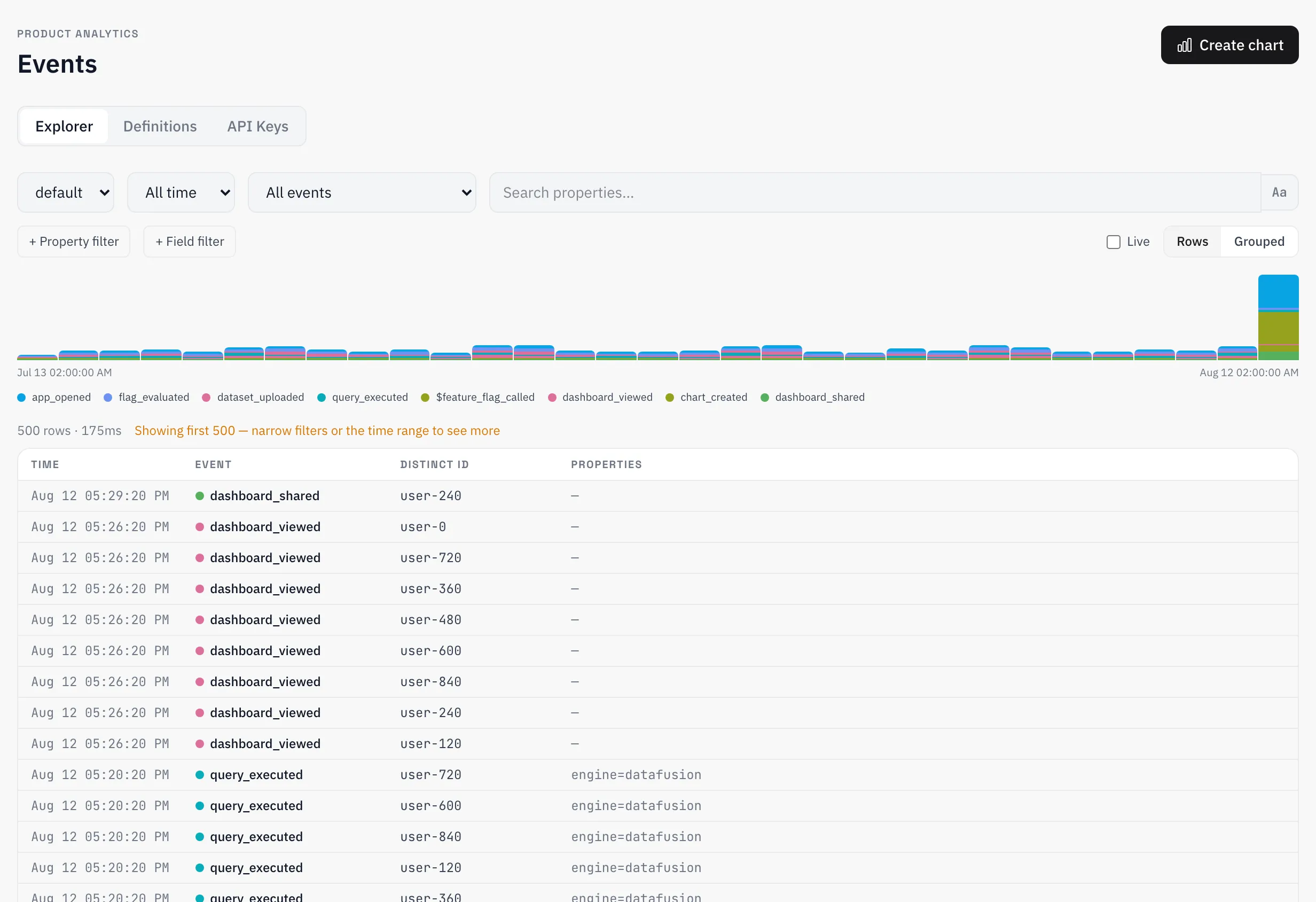
Events are also registered as a regular dataset per project, so anything the explorer doesn’t answer, SQL does — see Datasets. To reuse an audience across explorer views, save it as a cohort.
Tracking plan
Event definitions are your tracking plan: declare the events you intend to send, with descriptions and expected properties. The plan then classifies what actually arrives — declared (documented and seen), observed (arriving but undocumented), and unexpected (arriving but not in the plan). Unexpected events are flagged, never dropped — ingest never silently discards data because a plan is out of date.
Sessions, replay, and surveys
Session replay records browser sessions with rrweb through the capture SDK. The sampling rate and replay retention are configured per project by an admin — recording is off until someone deliberately turns it on. On the client it is gated further: the SDK starts a recording only in the full consent posture, so a visitor who opted out, sent Do-Not-Track, or declined your banner is never recorded even while the project has replay enabled. Surveys are created and launched from the app, delivered to the browser through the SDK’s bootstrap call, and can be stopped at any time; responses land as az.survey_sent events with a results view per survey. Both are focused features, not full suites: replay covers the browser SDK, and surveys cover launch, stop, and results.
Reference
Limits
| Limit | Value |
|---|---|
| Event name length | 200 characters |
Serialized properties size | 64 KiB per event |
| Reserved namespace | az.* — undeclared names rejected |
| Timestamp clamp | [2000-01-01, now + 1 day]; missing → server time |
| Rejection reporting | 200 with {accepted, rejected}, never a per-event 4xx |
| Backpressure | 429, retriable — SDKs requeue automatically |
Endpoints
| Endpoint | Auth | Purpose |
|---|---|---|
POST /api/v1/events | Secret azfive_… key (events:write) | Server-side capture |
POST /api/v1/events/batch | Secret azfive_… key (events:write) | Server-side capture, explicit batch |
POST /api/v1/events/ingest | Public azfive_pub_… token, origin-validated | Browser capture |
Ingestion is the only programmatic surface; the events explorer, tracking plan, and person views are part of the app.