Measures
Define revenue, retention, and conversion once in a governed catalog — as YAML or in the app — and reuse the same definition in every chart.
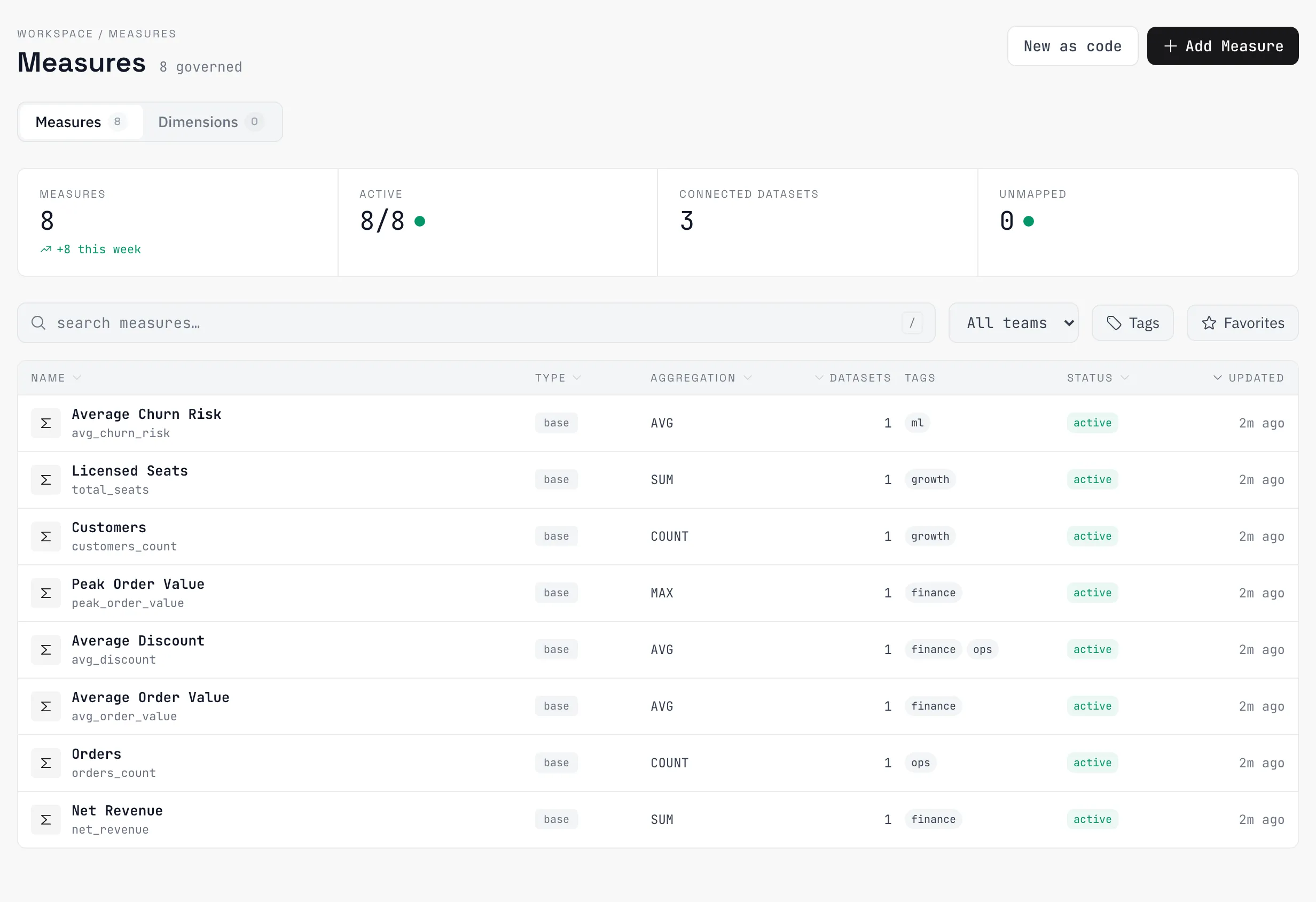
A measure is a named, governed definition of a number: what “revenue” aggregates, which rows count, over which column. Measures live in a catalog, map to datasets, and resolve in the chart builder — so two dashboards can’t quietly disagree about what churn means.
Why a semantic layer
Without one, every chart re-derives its numbers and every re-derivation is a chance to drift. A catalog measure is defined once, mapped to the datasets it applies to, and resolved to SQL at query time — change the definition and every chart using it follows. Four measure types:
| Type | Defines |
|---|---|
base | A column plus an aggregation, optionally filtered — SUM(amount) where status = 'completed' |
calculated | An expression over columns or other measures |
retention | Cohort retention from a user column and a time column |
conversion | A multi-step funnel with a time window |
Define a measure
Measures can be created in the app or written as YAML. The file form:
apiVersion: azfive/v1
kind: Metric
metadata:
  slug: revenue
  name: Revenue
spec:
  display_name: Revenue
  metric_type: base
  default_aggregation: SUM
  data_type: number
  mappings:
    - dataset:
        slug: orders
      column_name: amount
      filter_expression: status = 'completed'
The mappings list is what ties the abstract definition to concrete data: each entry points at a dataset (by id or slug) and names the column — with optional per-dataset aggregation and filter overrides, because the same measure can live in differently-shaped tables. The owner is recorded server-side from whoever created the measure; it is not settable through files.
Retention and conversion measures
These two types carry a config block instead of a column. The blocks are camelCase, and that is the only shape — the YAML you write, the stored config, and the query builder all share it; nothing converts casing on the way through.
spec:
  metric_type: retention
  retention:
    userColumn: person_id
    timeColumn: timestamp
    cohortGranularity: month
retentionGranularity: week| Retention field | Default | Meaning |
|---|---|---|
userColumn | required | The entity being retained |
timeColumn | required | Activity timestamp |
cohortGranularity | month | How entry cohorts are bucketed |
retentionGranularity | week | How return activity is bucketed |
cohortColumn / cohortValues | — | Restrict which rows count as cohort entry |
activityColumn / activityValues | — | Restrict which rows count as a return |
spec:
  metric_type: conversion
  conversion:
    steps:
      - label: Signed up
        eventName: signup
      - eventName: first_purchase
window: {value: 7, unit: days}| Conversion field | Default | Meaning |
|---|---|---|
steps | required | Ordered {label?, eventName, filters?} entries |
window | required | {value, unit} — unit is minutes, hours, or days |
strictOrder | true | Steps must occur in order |
exclusions | — | {eventName, filters?} entries; an entity that hits one inside the window is dropped from the funnel |
eventColumn | event | Column holding the event name |
userColumn | person_id | The entity moving through the funnel |
timeColumn | timestamp | Event timestamp |
When mapping a retention or conversion measure to a dataset, the mapping supplies user_column and time_column (plus event_column for conversion) instead of column_name — the defaults match product-analytics event streams, so those usually map with no overrides at all.
Use in charts
The chart builder lists the catalog measures mapped to the current dataset; picking one resolves it to governed SQL server-side. Charts can also define inline measures — one-off aggregations, or chart-local retention and conversion configs that live only in that chart. An inline measure worth keeping can be promoted to the catalog from the builder: it becomes a normal catalog measure mapped to the dataset, and the chart swaps to the catalog reference. Conformed dimensions are the group-by counterpart — a named column mapping (with optional hierarchy) that works across datasets.
Deleting a catalog measure deprecates it by default; a hard delete is blocked while charts or other measures still reference it.
Measures as code
Measures are one kind in a broader analytics-as-code contract. Every resource serializes to a YAML file with a versioned envelope — apiVersion: azfive/v1, a kind (Dataset, Chart, Dashboard, Pipeline, Metric, Dimension, EventDefinition), metadata (id, slug, name), and a kind-specific spec — synced through a per-org git repository. Edits in the app are committed as file changes; files edited in the repo apply back. Practical properties:
metadata.idis the identity; a hand-authored file gets one assigned and written back on first apply.- Serialization is deterministic, so an unchanged resource round-trips byte-identical — clean diffs.
- Authorization and runtime state (
org_id,owner_id, access levels, sync bookkeeping) are rejected in files — ownership and visibility are never file-configurable.